> ## Documentation Index
> Fetch the complete documentation index at: https://docs.blockscout.com/llms.txt
> Use this file to discover all available pages before exploring further.
# Adding and Updating Token Info
## Overview
Token pages on Blockscout can display extra information beyond what's on-chain. This can include project description, website, social links, and a verified icon. To add or update this information, you submit a request that goes through a QA review.
**What you'll need (minimum information required):**
| Field | Required? |
| ------------------------------------------------------------------------------------------------------------------------------------------------------------------------- | -------------------------------------------------- |
| Token name | Required |
| Token contract address | Required |
| Requester name | Required |
| Requester email | Required |
| Project email address (address created with the project's official domain, e.g. `yourusername@yourwebsitedomain.com`, or the official email address shown on the website) | Suggested |
| Project website (working links, clear information) | Suggested |
| Icon URL (48 x 48 SVG or PNG) | Required |
| Project description | Required |
| Social media links | Optional but recommended\* |
| Payment (wallet you are sending funds from and tx hash) | Optional, recommended for expedited processing\*\* |
\*A missing website or social presence won't block approval but does provide relevant context for token info and improves the chances of approval.
\*\*We offer the option to pay for expedited processing of token information. This guarantees we will review and approve or decline the listing within 7 days. If no payment is included we cannot guarantee any timeline for review, as we have 1,000s of tokens in the queue.
## Two ways to submit
Your submission path depends on whether the wallet you're submitting from can be automatically tied to the token.
### Path 1: Submission using the deployer address
If you control the wallet that deployed the token, verification is fast. Automated checks confirm the wallet information and you can go directly to token info submission.
**Steps**:
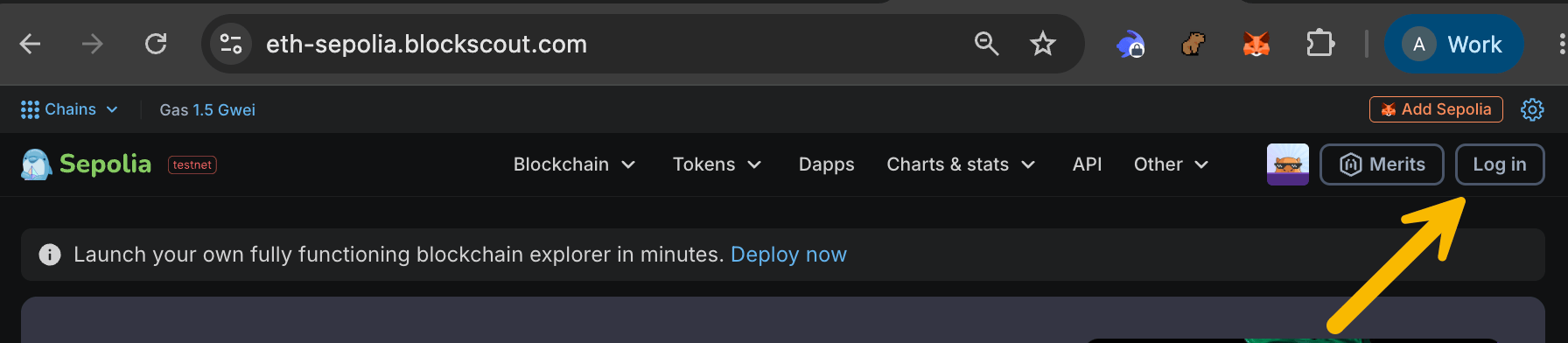
1. **Log in** to Blockscout using the same address used to deploy the token (you should also have an email address associated with this log in, add if you haven't done so already).
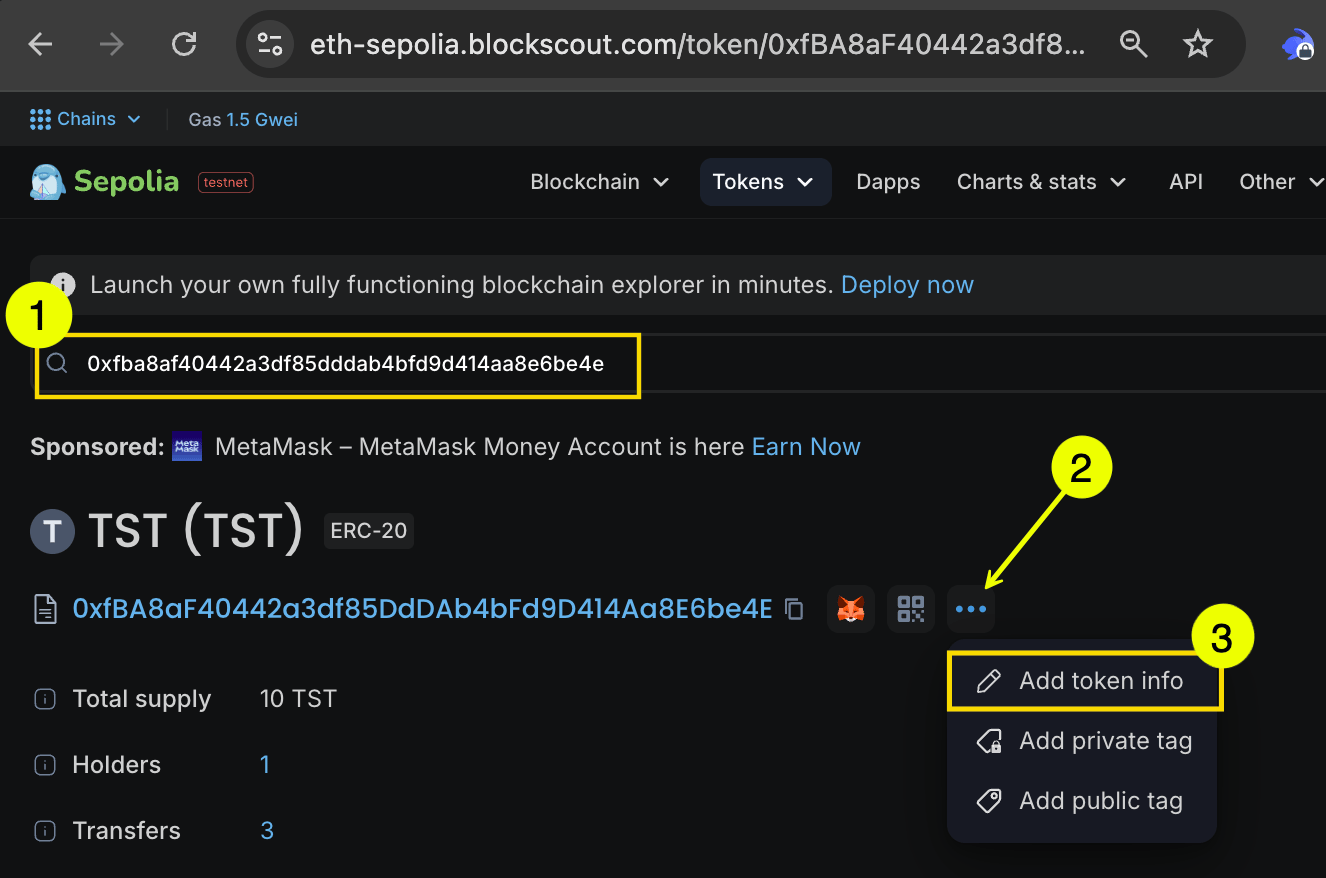
 2. Go to the token contract. You can access this in several ways.
3. Paste the token contract into search, then click the 3 dots to access **Add Token Info**
2. Go to the token contract. You can access this in several ways.
3. Paste the token contract into search, then click the 3 dots to access **Add Token Info**
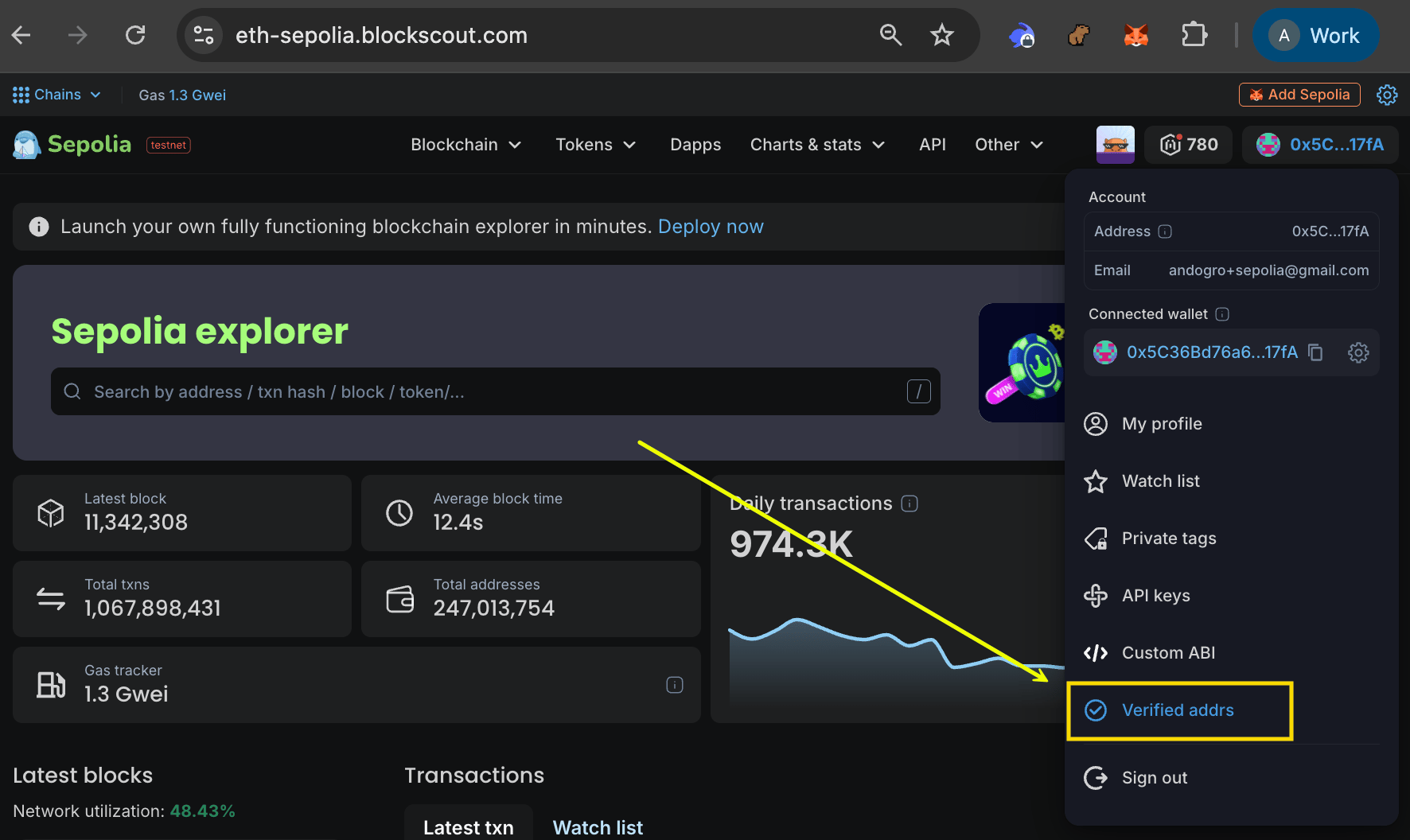
 1. Access from the **Verified addrs** item in your account dashboard.
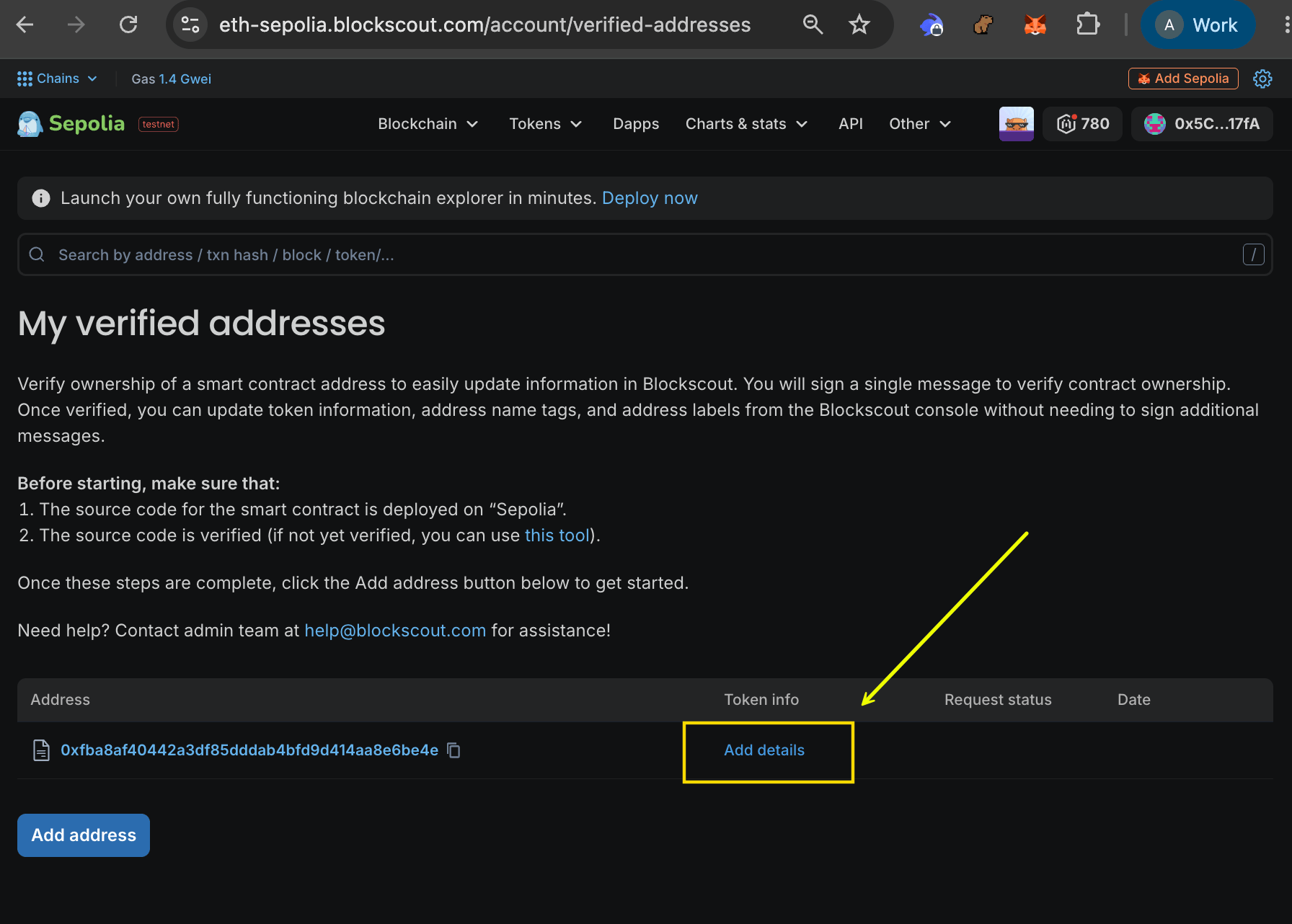 4. Enter your token details and **Send request.**
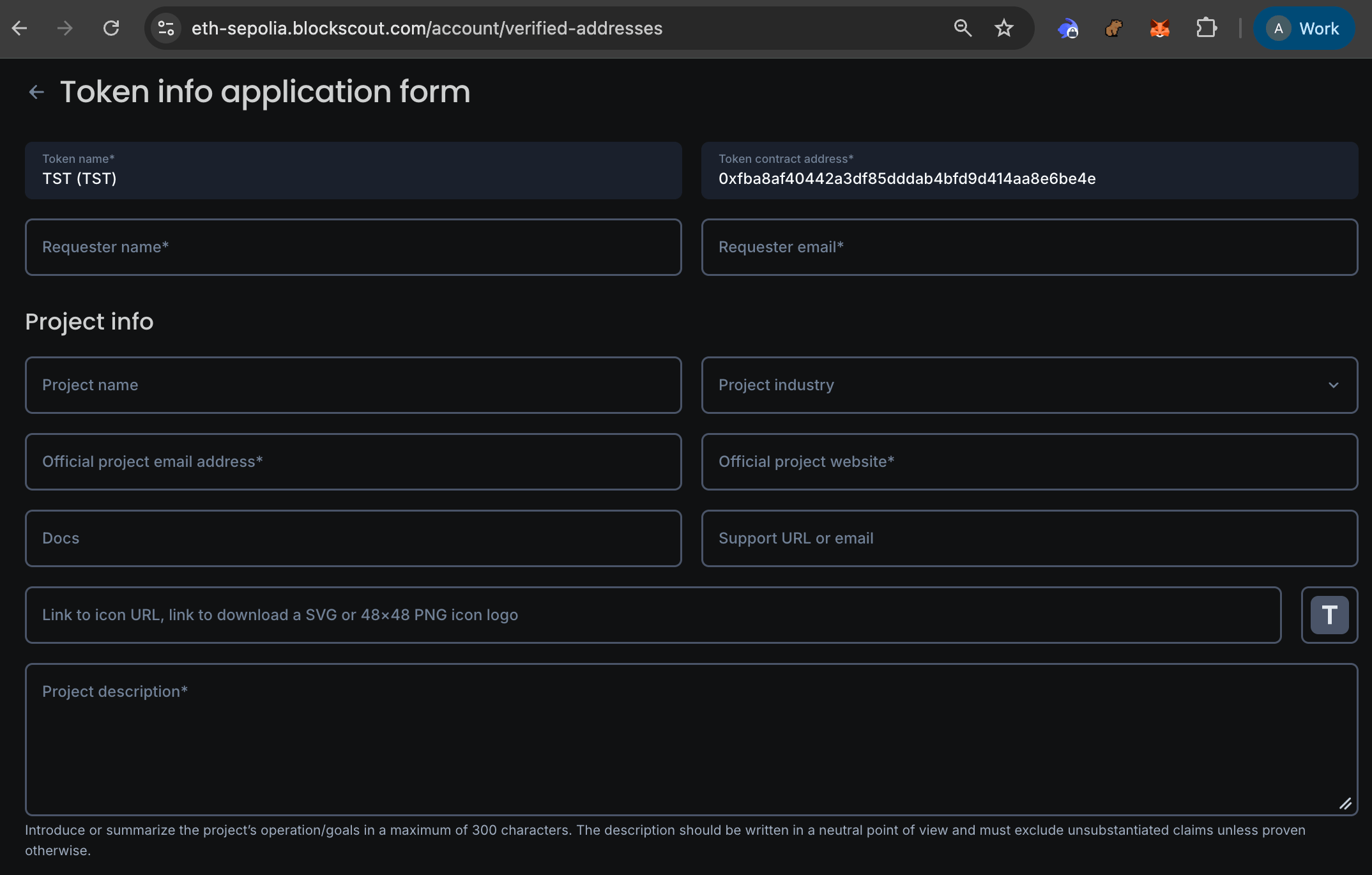
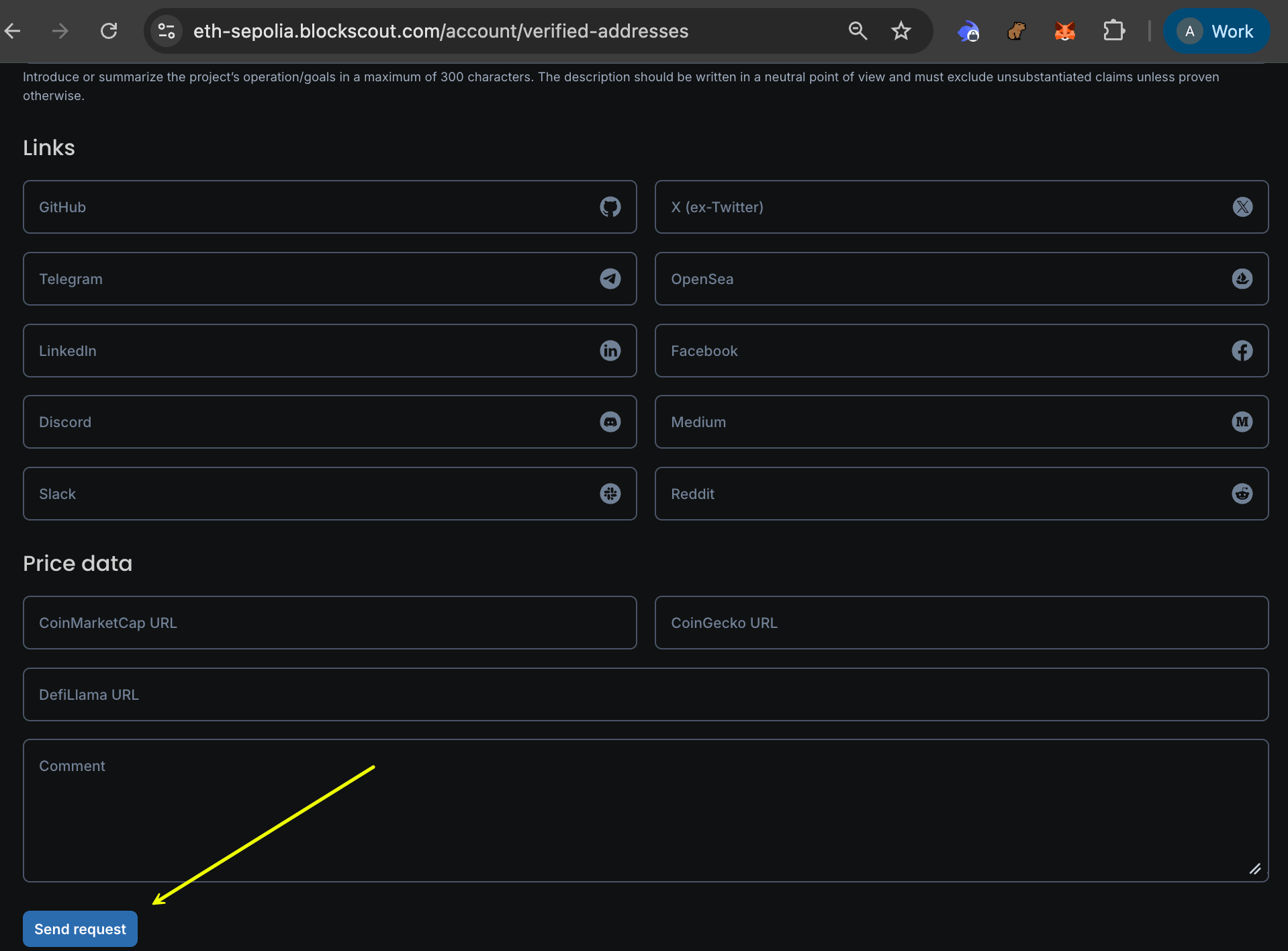 Your submission will move to review. During review you will be contacted about optional expedited payment processing (see below).
### Path 2: You can't submit from your wallet on the Blockscout UI
Your submission will move to review. During review you will be contacted about optional expedited payment processing (see below).
### Path 2: You can't submit from your wallet on the Blockscout UI
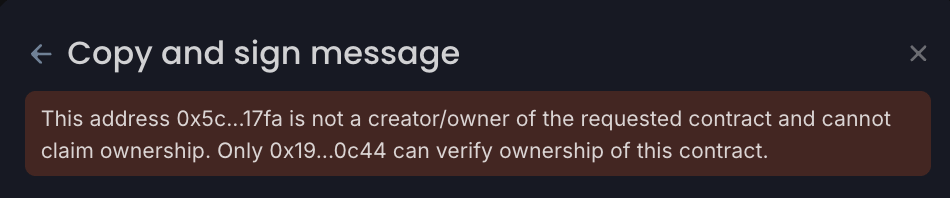 If the original deployer wallet is not accessible or was never yours (for example after a multisig migration, a treasury wallet change, a team handoff, or a factory contract deployment) you can still submit for verification.
**Steps:**
1. Send an email to [submissions@blockscout.com](mailto:submissions@blockscout.com) with your wallet, token information, and an explanation of your relationship to the project.
2. You will receive a reply with a link to provide additional specific information to the Blockscout team.
3. The team will review the proof and confirms the provided information manually before moving forward.
## Expedited Payment Process
While not required, expedited payment ensures we can review your token info in a timely manner (within 7 days). The payment process varies depending on whether you are following Path 1 or Path 2 submissions.
* Path 1: you will be contacted during the review process if you would like to pay for expedited review.
* Path 2: you will have the option to pay as a part of the during the manual submission.
To initiate the process, you will send **the requested amount in USDC or USDT** on the chain where your token is listed. Current supported networks include **Ethereum, Optimism, Base, and Robinhood Chain**.
You will then copy the transaction hash from this transaction and include it with your initial token information submission.
Payment does not guarantee your token info will be listed — it only guarantees that the team will review and approve or reject your submission within 7 days. Reasons for rejection are listed in the possible outcomes section below.
## Review Process: what happens after you submit
Path 1 submissions are checked automatically against deployer address/
If the original deployer wallet is not accessible or was never yours (for example after a multisig migration, a treasury wallet change, a team handoff, or a factory contract deployment) you can still submit for verification.
**Steps:**
1. Send an email to [submissions@blockscout.com](mailto:submissions@blockscout.com) with your wallet, token information, and an explanation of your relationship to the project.
2. You will receive a reply with a link to provide additional specific information to the Blockscout team.
3. The team will review the proof and confirms the provided information manually before moving forward.
## Expedited Payment Process
While not required, expedited payment ensures we can review your token info in a timely manner (within 7 days). The payment process varies depending on whether you are following Path 1 or Path 2 submissions.
* Path 1: you will be contacted during the review process if you would like to pay for expedited review.
* Path 2: you will have the option to pay as a part of the during the manual submission.
To initiate the process, you will send **the requested amount in USDC or USDT** on the chain where your token is listed. Current supported networks include **Ethereum, Optimism, Base, and Robinhood Chain**.
You will then copy the transaction hash from this transaction and include it with your initial token information submission.
Payment does not guarantee your token info will be listed — it only guarantees that the team will review and approve or reject your submission within 7 days. Reasons for rejection are listed in the possible outcomes section below.
## Review Process: what happens after you submit
Path 1 submissions are checked automatically against deployer address/
Path 2 submissions are reviewed manually against the proof you provide.
We search for tokens with matching names, symbols, or branding. Tokens may vary slightly; however, if exact duplicates exist, the token with the strongest liquidity, trading volume, and active trader count is treated as official, and copycat tokens are rejected.
If you include a website or socials, we check for phishing content, suspicious redirects, and impersonation of unrelated projects. This content helps verify correct information, and we recommend you include as much as you can.
Only if your website has a wallet-connect feature. We test it with a QA wallet holding no valuable assets, checking for unusual permission requests or unlimited spending approvals.
Approved, rejected, or sent back requesting more information.
**Expedited reviews are completed in 1 to 7 business days**. Standard requests have no guaranteed timeframe.
## Possible outcomes
**Approved** — your token info is confirmed and published shortly after.
**More information requested** — this typically means we couldn't confirm wallet ownership, or something in your submission was incomplete or inconsistent. You'll get a follow-up describing what's needed.
**Rejected** — a rejected submission must restart the full process, including a new fee if you want expedited processing.
### Common reasons for rejection
* **Payment issues.** The transaction can't be confirmed on-chain, the amount is incorrect, or the transaction hash was already used on another submission.
* **Wallet doesn't qualify.** You couldn't provide sufficient proof of ownership for the token.
* **Token impersonation.** The token exactly copies the name, symbol, and branding of an established token.
* **Phishing behavior.** A linked website contains phishing content or redirects to a suspicious domain.
* **Suspicious wallet permissions.** A linked website's wallet-connect feature requests unlimited spending approvals, unexpected token approvals, or access to unrelated assets.
* **Requests for private keys or seed phrases.** Anywhere in the website or submission flow.
* **Misleading or misrepresented information.** Submitted details are inaccurate or intentionally misleading. Token name, logo, designs, symbol, and other information are fraudulent, infringe copyright, or misrepresent public entities.
Every submission is final once sent for review. Double-check your token name, contract address, and links before submitting to avoid a rejection.
## FAQ
No. The fee is non-refundable regardless of whether your submission is approved, rejected, or requires resubmission.
No. A missing website or social presence doesn't block approval on its own, but is recommended.
Ethereum, Optimism, Base, and Robinhood Chain. Send 99 USDC or USDT to the address in the [Expedited Payment Process](#expedited-payment-process) section.
Expedited reviews typically complete in 1 to 7 business days. Standard requests have no guaranteed timeframe.
Use Path 2. Email our QA team at [submissions@blockscout.com](mailto:submissions@blockscout.com) with proof of your relationship to the project, such as a signed message or a post from the project's verified social account.
No. Duplicate submissions for the same contract address create backlogs and slow down processing. If you have issues with your current request, reply to your original submission thread instead of sending a new one.
Not immediately. Every submission is final once sent for review. However, once approved, token info can be resubmitted if something needs correcting.
We compare liquidity, trading volume, active traders, token age, and transaction count. The token with the strongest legitimate activity is treated as official; a newer duplicate attempting to impersonate it will be rejected.