To learn about integrating with additional TypeScript frameworks, see our wallet example repository.
Examples use the Rootstock ecosystem where our wallet is currently integrated. If you are interested in wallet support for your ecosystem, Contact the Blockscout team today.

Resources

Installation

  1. Install the global wallet SDK
npm install @blockscout/rootstock-global-wallet
  1. Import into your project
import "@blockscout/rootstock-global-wallet/ethereum";
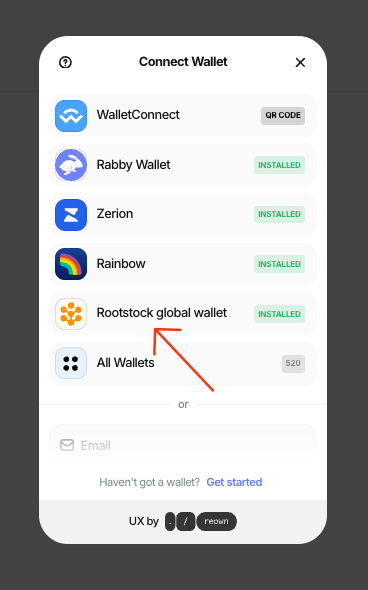
The wallet is now available for usage! Image

Gas Sponsorship / Paymasters

Gas sponsorship is available through provider interagrations. In this example we use Gelato; various providers such as Pimlico, ZeroDev or Biconomy can also be used.

Get started with Gelato

  1. Request API Key
To enable the paymaster for the global wallet, you need to have an API key first. To get an API key, please fill out the form and we will send you one.
  1. Install Gelato and dependencies
npm install @gelatonetwork/smartwallet @dynamic-labs/sdk-react-core @dynamic-labs/ethereum @dynamic-labs/wagmi-connector @tanstack/react-query wagmi viem
  1. Create .env variable and add API key
NEXT_PUBLIC_GELATO_API_KEY=your_gelato_api_key
  1. Create a Gelato Smart Wallet Client for sponsored operations
const App = () => {
  const sendTransaction = async () => {
    const { primaryWallet, handleLogOut } = useDynamicContext();

    if (!primaryWallet || !isEthereumWallet(primaryWallet)) {
      return;
    }

    const connector = primaryWallet.connector;

    if (!connector || !isDynamicWaasConnector(connector)) {
      return;
    }

    if (chain.id) {
      await primaryWallet.switchNetwork(chain.id);
    }

    const client = await primaryWallet.getWalletClient();

    client.account.signAuthorization = async (parameters) => {
      const preparedAuthorization = await prepareAuthorization(
        client,
        parameters
      );
      const signedAuthorization = await connector.signAuthorization(
        preparedAuthorization
      );

      return {
        address: preparedAuthorization.address,
        chainId: preparedAuthorization.chainId,
        nonce: preparedAuthorization.nonce,
        r: signedAuthorization.r,
        s: signedAuthorization.s,
        v: signedAuthorization.v,
        yParity: signedAuthorization.yParity,
      } as SignAuthorizationReturnType;
    };

    const smartWalletClient = await createGelatoSmartWalletClient(client, {
      apiKey: process.env.NEXT_PUBLIC_GELATO_API_KEY,
      scw: { type: "gelato" }, // use gelato, kernel, safe, or custom
    });
  };
  return (
    <div>
      <button onClick={sendTransaction}>Send Transaction</button>
    </div>
  );
};
  1. Execute transactions using different payment methods a. Sponsored transactions
    const results = await smartWalletClient?.execute({
      payment: sponsored(),
      calls: [
        {
          to: "0xa8851f5f279eD47a292f09CA2b6D40736a51788E",
          data: "0xd09de08a",
          value: 0n,
        },
      ],
    });
    
    b. ERC-20 tokens (example uses USDC on Base Sepolia)
    import { erc20 } from "@gelatonetwork/smartwallet";
    
    const token = "0x036CbD53842c5426634e7929541eC2318f3dCF7e"; // USDC (Base Sepolia)
    
    const results = await smartWalletClient?.execute({
      payment: erc20(token),
      calls: [
        {
          to: "0xa8851f5f279eD47a292f09CA2b6D40736a51788E",
          data: "0xd09de08a",
          value: 0n,
        },
      ],
    });
    
    c. Native tokens (ie RBTC)
    import { native } from "@gelatonetwork/smartwallet";
    
    const results = await smartWalletClient?.execute({
      payment: native(),
      calls: [
        {
          to: "0xa8851f5f279eD47a292f09CA2b6D40736a51788E",
          data: "0xd09de08a",
          value: 0n,
        },
      ],
    });
    

More details

See below for more info on gas sponsoring with Gelato
  1. https://github.com/gelatodigital/smartwallet/tree/master/plugins/react/dynamic
  2. https://docs.gelato.cloud/smart-wallet-sdk/integration-guides/dynamic